

How Do VLANs Work? Exploring Virtual LANs
Introduction
Virtual LANs (VLANs) are a fundamental networking technology that allows network administrators to logically segment a physical network into multiple isolated broadcast domains. This segmentation improves network performance, security, and manageability without requiring additional physical infrastructure.
This guide will explain what VLANs are, how they work, their benefits, configuration methods, and practical implementation scenarios.
What is a VLAN?
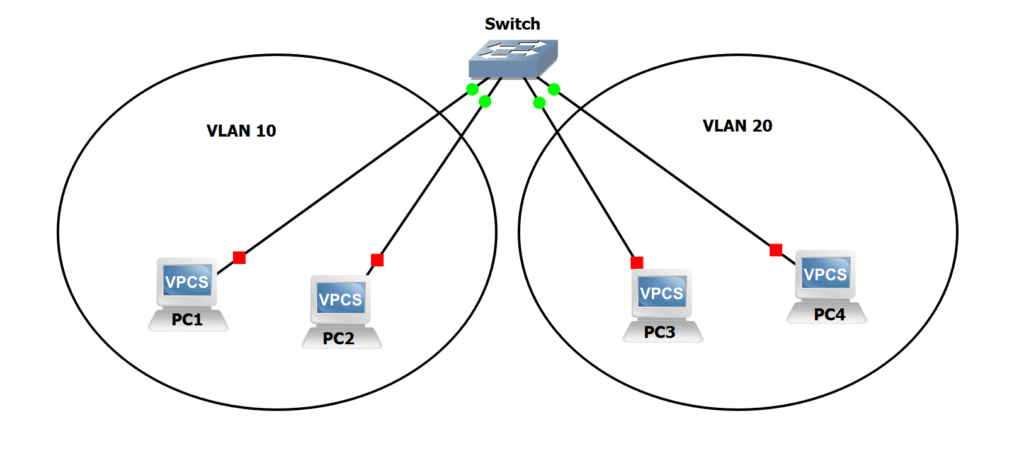
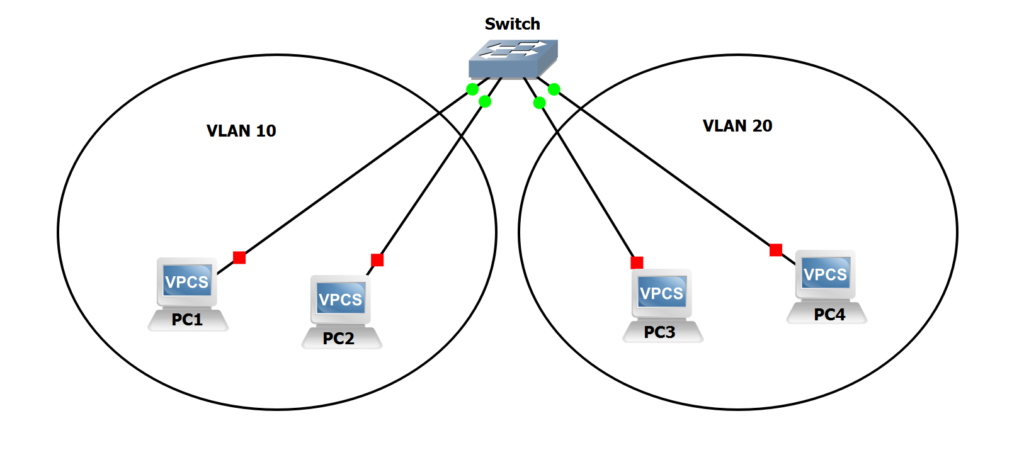
A Virtual LAN (VLAN) is a logical grouping of network devices that appear to be on the same LAN regardless of their physical location. Devices in the same VLAN can communicate with each other as if they were connected to the same physical switch, even if they're spread across multiple switches.
Key Concepts
- Logical Segmentation: VLANs create logical network segments independent of physical connections
- Broadcast Domain: Each VLAN is its own broadcast domain
- Traffic Isolation: VLANs isolate traffic between different groups
- Flexibility: Devices can be moved to different VLANs without physical rewiring
How VLANs Work
Traditional LAN vs VLAN
Traditional LAN:
- All devices on a switch are in the same broadcast domain
- Broadcast traffic goes to all devices
- Limited security and control
VLAN:
- Multiple logical networks on the same physical switch
- Broadcast traffic stays within each VLAN
- Better security and control
VLAN Tagging
VLANs work by adding a VLAN tag (also called VLAN ID) to Ethernet frames. This tag identifies which VLAN the frame belongs to.
802.1Q Standard:
- Adds a 4-byte tag to Ethernet frames
- Contains VLAN ID (12 bits = 4094 possible VLANs)
- VLAN ID 0 and 4095 are reserved
Frame Structure:
[Ethernet Header] [802.1Q Tag] [Type/Length] [Data] [FCS]
                   └─ VLAN ID ─┘
VLAN Types
-
Port-Based VLANs (Static VLANs)
- Ports are assigned to VLANs manually
- Most common type
- Simple to configure
-
MAC-Based VLANs
- VLAN assignment based on MAC address
- Device moves, VLAN assignment follows
- More complex configuration
-
Protocol-Based VLANs
- VLAN assignment based on protocol type
- Less common
- Used for specific network designs
-
Dynamic VLANs
- VLAN assignment via authentication (802.1X)
- Most flexible
- Requires authentication server
Benefits of VLANs
1. Improved Security
- Traffic Isolation: Devices in different VLANs cannot communicate without routing
- Access Control: Easier to implement security policies
- Reduced Attack Surface: Limits broadcast domain exposure
2. Better Performance
- Reduced Broadcast Traffic: Smaller broadcast domains
- Network Efficiency: Less unnecessary traffic
- Bandwidth Optimization: Traffic stays within relevant VLANs
3. Simplified Management
- Logical Grouping: Organize devices by function, department, or location
- Easier Moves/Adds/Changes: Change VLAN assignment without rewiring
- Centralized Configuration: Manage from switch configuration
4. Cost Savings
- No Additional Hardware: Use existing switches
- Reduced Cabling: No need for separate physical networks
- Scalability: Easy to add new VLANs
VLAN Configuration
Basic VLAN Setup
Cisco Switches
! Create VLANs
Switch(config)# vlan 10
Switch(config-vlan)# name Sales
Switch(config-vlan)# exit

Switch(config)# vlan 20
Switch(config-vlan)# name Engineering
Switch(config-vlan)# exit

! Assign ports to VLANs
Switch(config)# interface gigabitethernet 0/1
Switch(config-if)# switchport mode access
Switch(config-if)# switchport access vlan 10
Switch(config-if)# exit

Switch(config)# interface gigabitethernet 0/2
Switch(config-if)# switchport mode access
Switch(config-if)# switchport access vlan 20
Switch(config-if)# exit

! Configure trunk port (for inter-switch communication)
Switch(config)# interface gigabitethernet 0/24
Switch(config-if)# switchport mode trunk
Switch(config-if)# switchport trunk allowed vlan 10,20
Switch(config-if)# exit
Linux (using VLAN interfaces)
# Install VLAN package
sudo apt install vlan

# Load 8021q module
sudo modprobe 8021q

# Create VLAN interface
sudo ip link add link eth0 name eth0.10 type vlan id 10

# Configure IP address
sudo ip addr add 192.168.10.1/24 dev eth0.10

# Bring interface up
sudo ip link set dev eth0.10 up
VLAN Ranges
Different VLAN ID ranges serve different purposes:
- VLAN 1: Default VLAN (usually not recommended for production)
- VLANs 2-1001: Normal range (can be created/modified)
- VLANs 1002-1005: Reserved for legacy protocols (FDDI, Token Ring)
- VLANs 1006-4094: Extended range (requires specific configuration)
VLAN Trunking
What is Trunking?
Trunking allows a single physical link to carry traffic for multiple VLANs. This is essential when VLANs span multiple switches.
Trunk Port Configuration
Access Port:
- Carries traffic for a single VLAN
- Connects end devices (computers, printers)
- Removes VLAN tag before sending to device
Trunk Port:
- Carries traffic for multiple VLANs
- Connects switches together
- Preserves VLAN tags
Trunking Protocols
-
802.1Q (IEEE Standard)
- Industry standard
- Supported by all modern switches
- Adds 4-byte tag to frames
-
ISL (Inter-Switch Link)
- Cisco proprietary
- Older protocol
- Adds 26-byte header and 4-byte trailer
Native VLAN
The Native VLAN is the VLAN that traverses a trunk link without a tag. By default, this is VLAN 1.
Important: Native VLAN must match on both ends of a trunk link.
Inter-VLAN Routing
The Problem
Devices in different VLANs cannot communicate with each other because they're in separate broadcast domains. To enable communication, you need routing.
Solutions
-
Router-on-a-Stick
- Single router interface with sub-interfaces
- Each sub-interface handles one VLAN
- Cost-effective for small networks
-
Layer 3 Switch
- Switch with routing capabilities
- Faster than router-on-a-stick
- More expensive
-
Multilayer Switch
- Combines switching and routing
- Best performance
- Enterprise solution
Router-on-a-Stick Configuration
! Router configuration
Router(config)# interface gigabitethernet 0/0
Router(config-if)# no ip address
Router(config-if)# exit

Router(config)# interface gigabitethernet 0/0.10
Router(config-subif)# encapsulation dot1q 10
Router(config-subif)# ip address 192.168.10.1 255.255.255.0
Router(config-subif)# exit

Router(config)# interface gigabitethernet 0/0.20
Router(config-subif)# encapsulation dot1q 20
Router(config-subif)# ip address 192.168.20.1 255.255.255.0
Router(config-subif)# exit
Practical VLAN Scenarios
Scenario 1: Department-Based Segmentation
Network Design:
- VLAN 10: Sales Department (192.168.10.0/24)
- VLAN 20: Engineering Department (192.168.20.0/24)
- VLAN 30: HR Department (192.168.30.0/24)
- VLAN 40: Guest Network (192.168.40.0/24)
Benefits:
- Departments isolated from each other
- Easier to apply department-specific policies
- Guest network completely isolated
Scenario 2: Security Zones
Network Design:
- VLAN 10: DMZ (Public servers)
- VLAN 20: Internal Servers
- VLAN 30: Workstations
- VLAN 40: Management Network
Security:
- DMZ isolated from internal network
- Management network highly restricted
- Workstations can access servers but not DMZ directly
Scenario 3: Voice and Data Separation
Network Design:
- VLAN 10: Data Network
- VLAN 20: Voice Network (VoIP phones)
- VLAN 30: Wireless Network
Benefits:
- Voice traffic prioritized
- Data and voice isolated
- Easier QoS implementation
VLAN Best Practices
1. Planning
- Document VLAN assignments: Keep a VLAN database
- Use consistent numbering: Develop a numbering scheme
- Plan for growth: Reserve VLAN IDs for future use
2. Security
- Don't use VLAN 1: Change default VLAN
- Secure trunk ports: Limit allowed VLANs
- Use private VLANs: For additional isolation
- Implement access control: Use ACLs between VLANs
3. Management
- Name VLANs descriptively: Use clear, meaningful names
- Document configurations: Maintain network documentation
- Regular audits: Review VLAN assignments periodically
- Monitor traffic: Use network monitoring tools
4. Troubleshooting
- Verify VLAN assignments: Check port configurations
- Check trunk links: Ensure proper trunk configuration
- Verify routing: Confirm inter-VLAN routing works
- Test connectivity: Use ping and traceroute
Common VLAN Issues and Solutions
Issue 1: Devices Can't Communicate
Possible Causes:
- Ports not in same VLAN
- Trunk not configured properly
- Routing not configured
Solutions:
- Verify VLAN assignments
- Check trunk configuration
- Verify routing configuration
Issue 2: Native VLAN Mismatch
Symptom: Intermittent connectivity, errors on trunk
Solution: Ensure native VLAN matches on both ends
Switch(config)# interface gigabitethernet 0/24
Switch(config-if)# switchport trunk native vlan 99
Issue 3: VLAN Not Propagating
Symptom: VLAN exists on one switch but not others
Solution: Use VTP (VLAN Trunking Protocol) or manually create on all switches
Issue 4: Broadcast Storms
Symptom: Network performance degradation
Solution:
- Implement proper VLAN segmentation
- Use spanning tree protocol
- Monitor network traffic
Advanced VLAN Concepts
Private VLANs (PVLANs)
Purpose: Further isolate devices within the same VLAN
Types:
- Primary VLAN: Main VLAN
- Isolated VLAN: Devices can't communicate with each other
- Community VLAN: Devices can communicate within community
VLAN Access Control Lists (VACLs)
Purpose: Apply ACLs at the VLAN level
Use Cases:
- Filter traffic within a VLAN
- Prevent certain types of traffic
- Implement security policies
Dynamic VLAN Assignment
802.1X Authentication:
- Device authenticates before network access
- VLAN assigned based on authentication result
- Provides dynamic, secure VLAN assignment
VLAN in Virtualization
Hypervisor VLANs
Modern hypervisors support VLAN tagging:
VMware vSphere:
- VLAN tagging at vSwitch level
- Supports 802.1Q tagging
- VLAN trunking to physical switches
Proxmox:
- VLAN configuration in network settings
- Supports VLAN-aware bridges
- Tagged and untagged VLANs
Container VLANs
Docker:
- Custom networks with VLAN support
- Bridge networks
- Overlay networks
Kubernetes:
- CNI plugins with VLAN support
- Network policies
- Service mesh integration
Monitoring and Troubleshooting
Useful Commands
Cisco Switches:
! Show VLAN information
show vlan brief
show vlan id 10

! Show interface VLAN
show interface vlan 10

! Show trunk information
show interfaces trunk

! Show spanning tree
show spanning-tree vlan 10
Linux:
# Show VLAN interfaces
ip link show type vlan

# Show VLAN configuration
cat /proc/net/vlan/config

# Monitor VLAN traffic
tcpdump -i eth0.10
Network Monitoring Tools
- Wireshark: Packet analysis with VLAN filtering
- SNMP: Monitor VLAN statistics
- Network Management Systems: Monitor VLAN health
- NetFlow/sFlow: Traffic analysis per VLAN
Conclusion
VLANs are a powerful networking technology that provides:
- Logical Network Segmentation: Without physical rewiring
- Improved Security: Through traffic isolation
- Better Performance: By reducing broadcast domains
- Simplified Management: Through logical grouping
- Cost Savings: Using existing infrastructure
Understanding VLANs is essential for:
- Network administrators
- System engineers
- Security professionals
- Anyone working with enterprise networks
Best Practices Summary
- ✅ Plan your VLAN structure before implementation
- ✅ Use descriptive VLAN names
- ✅ Document all VLAN assignments
- ✅ Secure trunk ports
- ✅ Avoid using VLAN 1 for production
- ✅ Implement proper inter-VLAN routing
- ✅ Monitor VLAN traffic
- ✅ Regular VLAN audits
- ✅ Use consistent numbering schemes
- ✅ Test configurations before production
Additional Resources
- IEEE 802.1Q Standard
- Cisco VLAN Configuration Guides
- Network+ and CCNA Certification Materials
- Wireshark VLAN Filtering Documentation
Mastering VLANs will significantly improve your network design and troubleshooting capabilities. Practice configuring VLANs in lab environments and experiment with different scenarios to deepen your understanding.